Keep the scanner in hand.
Keep Amazon orders moving.
Scan the order, scan the box, check each unit, and print the label in one packing flow. PolyBag brings your scanner, scale, and printer together, with Amazon Buy Shipping, Prime order handling, and Transparency code capture built in.
For teams shipping their own Amazon orders, including Seller Fulfilled Prime, from the continental US. Built around roughly 50+ shipments a day.
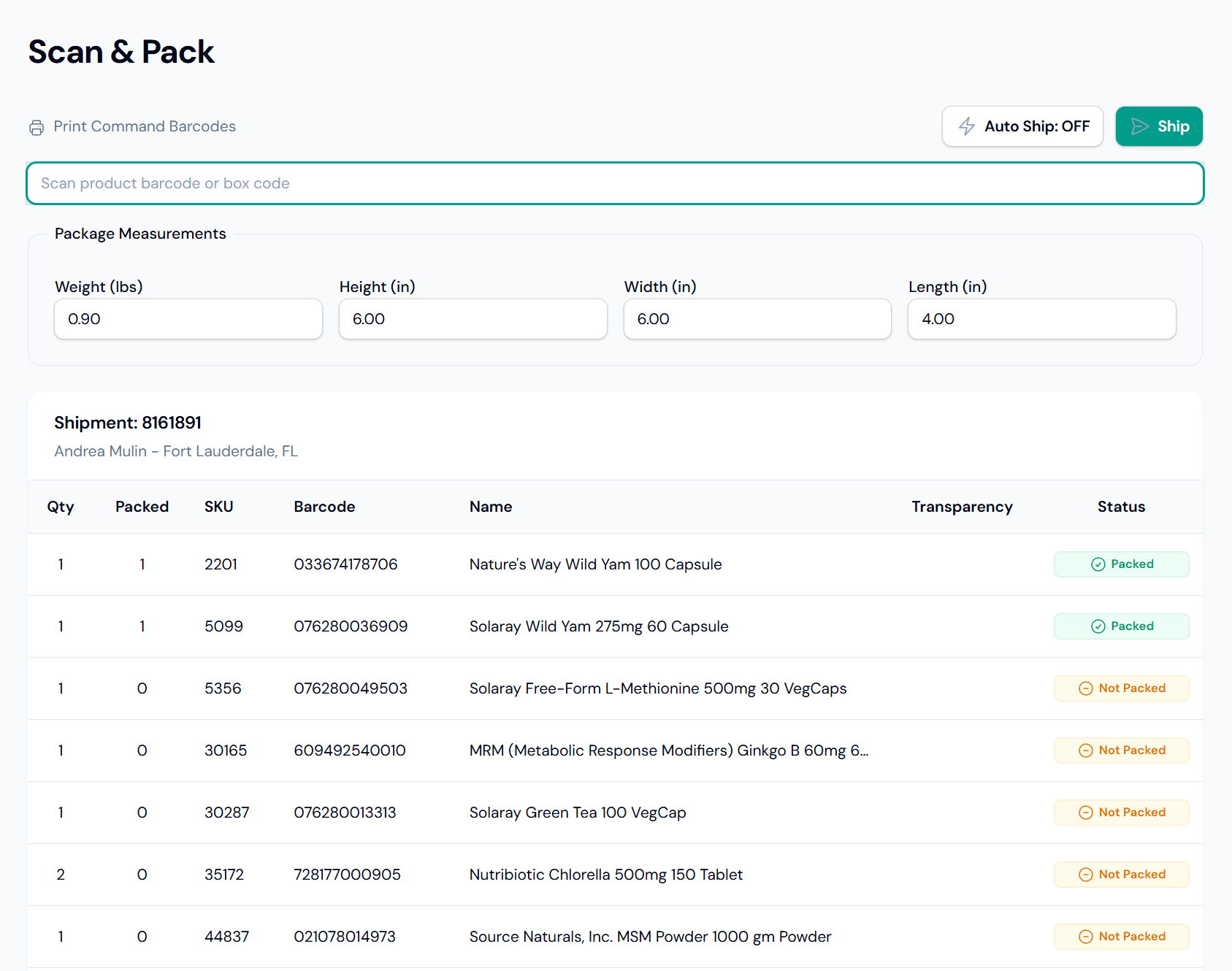
Check the box before you buy the label.
The same station handles the contents and the label. Your team packs the order; your configured methods guide the shipping choice.
Watch the packing workflow
- 01 · Order
Scan the packing slip
Load the shipment and the items to pack.
- 02 · Box
Scan the box code
Apply saved dimensions without typing them in.
- 03 · Contents
Scan each unit
Check products and quantities against the order.
- 04 · Label
Weigh and scan to ship
With Auto Ship configured, buy and print an eligible label, then load the next order.
With item validation enabled, all required quantities must be packed before shipping. Choices that need a person go to the shipping screen. Transparency items require an additional code scan per applicable unit.
Count the work around every label.
You can already get protected labels through free shipping software. PolyBag is worth considering when order lookup, box selection, item checks, and label printing still take too much work at your bench.
- Keep the scanner in hand
- Order lookup, box selection, item checks, and the ship command use the same scan input. A connected scale supplies the weight; configured Auto Ship buys, prints, and resets for the next order.
- Catch a packing problem before shipping
- Wrong-item and excess-quantity scans are flagged immediately. With validation enabled, all required quantities must be packed before the label can be bought.
- Give each packer the same process
- Saved box dimensions and shipping rules turn routine choices into setup. New packers follow the order on screen, with fewer details to remember for each shipment.
Make the case with your own orders. Compare the time and manual steps from opening an order to starting the next one. Include checking contents, printing, and correcting mistakes. Then weigh the difference against PolyBag's fee at your volume. The workflow needs to earn the switch.
Prime orders, Transparency scans, and tracking belong in the process.
- Buy Shipping in the packing flow
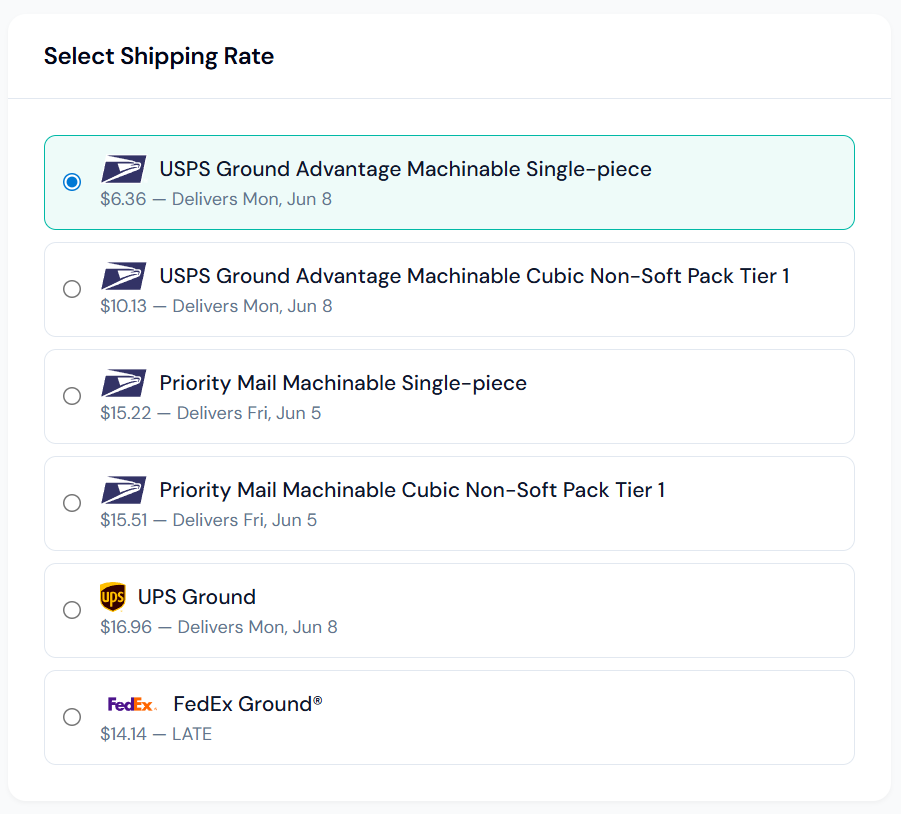
- Buy eligible Amazon label offers from the workstation. Quotes and purchases stay tied to the originating order, with methods controlling the services and postage sources your team can use.
- Recognize the order program
- Prime orders import with a badge. Shipping rules can target Amazon programs, and methods can require protected offers for Prime, Premium, or other Amazon orders.
- Capture Transparency codes
- Prompt for an additional code on each applicable unit during packing. Orders requiring Transparency codes stay out of batch label runs.
- Send tracking back to Amazon
- Order import and fulfillment export keep Amazon connected to the workstation. Packed quantities, package measurements, and the purchased label stay with the shipment for reference.
PolyBag enforces your configured offer requirements. It does not guarantee delivery, claim reimbursement, or continued Seller Fulfilled Prime eligibility.
Your packers shouldn't have to study a rate list for every box.
Define allowed services, delivery-date requirements, and which Amazon orders need an OTDR-protected offer. Auto Ship selects the cheapest quote that meets your setup. If none qualifies, automatic purchase does not proceed.
- Keep protected offers in the workflow
- A cheaper direct-carrier quote cannot bypass a configured protection requirement. PolyBag checks the attributes Amazon reports; Amazon's eligibility conditions still apply.
- Use your existing carrier agreements
- Supported accounts linked in Seller Central can return your negotiated rates through Buy Shipping. Direct USPS, FedEx, and UPS connections also work across channels, but direct labels don't carry Buy Shipping protection.
Questions from merchant-fulfilled sellers
Why pay for PolyBag if I already use Veeqo?
Veeqo's free Shipping plan already includes protected labels. The reason to evaluate PolyBag is how the whole packing job works: loading the order, scanning the box and items, reading the scale, buying and printing, then starting the next order. Compare that loop with your current setup using the same orders and hardware. PolyBag needs to save enough work or help avoid enough rework to justify its fee. A demo walks through that comparison with your own order mix. See Veeqo's current plans.
Does this work for Seller Fulfilled Prime?
Yes. PolyBag imports merchant-fulfilled Prime orders, displays their program badge, and lets you configure shipping rules and protected-offer requirements for them. You remain responsible for Amazon's program requirements, shipping settings, and on-time handoff to the carrier. PolyBag does not manage your Prime templates or qualify you for the program.
Does requiring an OTDR-protected offer guarantee protection?
No. PolyBag enforces the attributes Amazon reports on the shipping offer. Amazon's conditions, including applicable shipping automation settings and shipping on time, still determine protection. This is not a delivery guarantee or a promise of claim reimbursement. Review Amazon's current on-time delivery policy for your account and order program.
Is Amazon Buy Shipping the same as Amazon Shipping?
No. Buy Shipping supplies label offers tied to an Amazon order. Amazon Shipping is a delivery service with separate account enablement and coverage. Using Amazon Shipping for another channel does not make that order an Amazon Buy Shipping order.
Can my Shopify orders use the same stations?
Yes. Both channels use the packing workstation, with shipping methods and rules configured for each. Amazon Buy Shipping stays tied to Amazon orders. See the Shopify packing workflow and postage options.
What do we need at the packing bench?
A scanner, supported scale, and label printer. PolyBag runs in modern browsers on Windows, macOS, and Linux, with a lightweight local bridge for printing and scale connections. We'll check your hardware, product barcodes, shipping methods, and Amazon connection during setup.
Put your current packing process beside ours.
Bring a typical order, a multi-item order, and any Prime or Transparency requirements. We'll walk through the complete packing loop with your hardware and shipping setup, so you can judge whether the change is worth paying for.
Early access, with guided setup and direct support from the people building PolyBag. Questions first? hello@polybag.app